Volaris
- 4.6
- Rating
- 1.00M
- Installs
- Free
- Price

 Analysis by App-foxy
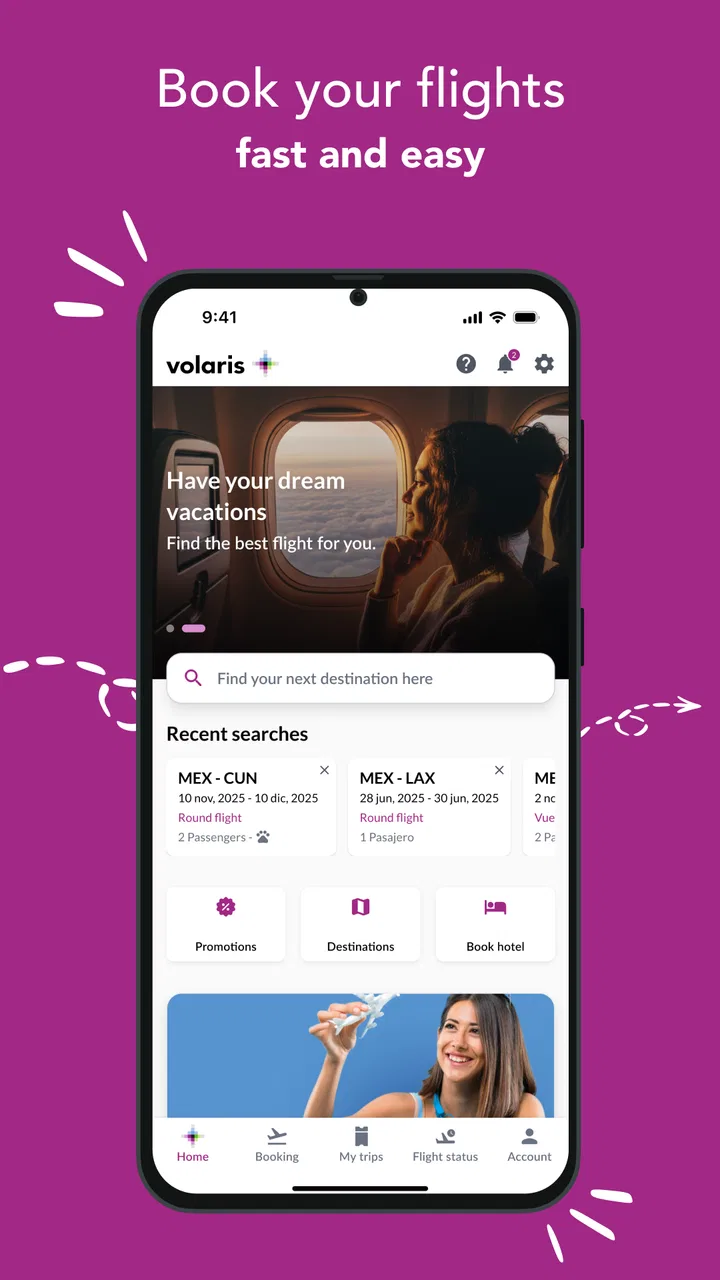
When I travel with an airline app, I want less searching, fewer surprises, and a clear path from booking to boarding. Volaris is built around that practical idea: it is a free travel and local app from Volaris that brings trip-related tasks together instead of making me jump between a browser, email, and airport screens. I found its strongest value in the moments when I already have a Volaris trip in progress and need quick access to the details that matter.
That focus also makes the app easier to judge honestly. It is not a general travel planner, a universal flight comparison tool, or a replacement for every airport service. It is most useful when Volaris is the airline involved. The experience feels more purposeful in that situation, while travelers comparing several airlines may still prefer a broader booking service or the airline apps for each carrier.
How the app feels to read and navigate
The first thing I noticed is that an airline companion should reduce mental load, not add another complicated layer. Volaris presents itself as a single place for the trip, so I approached it as a tool for checking information, managing travel steps, and returning to the same journey when plans become urgent. That is a better fit for a traveler who wants a direct route to their own reservation than for someone casually browsing destinations.
You May Also Like

 Blood Strike: 2.5 Anniversary
Blood Strike’s Loadouts Turn Every Drop Into a Tactical Gamble
A close look at Blood Strike’s custom loadouts: how fast access to signature weapons reshapes its battle royale rhythm, rewards preparation, and narrows the gap between fights.

 Pandora - Music & Podcasts
Pandora’s Music Is Easy to Start, but Harder to Recover
Pandora’s strength is its low-effort path from a seed to a station. Its weak spot is how much confidence it asks you to place in connection, setup, and quiet recovery.

 8 Ball Pool
 Is Built on Rivalries, Rematches, and Routine
A close look at the rivalries, rematches, shared routines, and unanswered safety questions that turn a quick pool match into a persistent mobile community.

 Samsung Music
’s Quiet Strength Is Playing What You Already Own
Its reach comes less from spectacle than from dependable access to a personal library. That simplicity is both the app’s strongest retention engine and its ceiling.

 AccuWeather: Weather Radar
AccuWeather Review: A Quick, Clear Forecast for Everyday Decisions
For everyday plans, the best forecast is the one you can understand quickly. AccuWeather makes rain timing, radar, and local conditions easy to act on, with a few trade-offs.

 Hill Climb Racing
Why Hill Climb Racing Still Turns Crashes Into One More Run
A tiny car, a bumpy hill and one more upgrade: Hill Climb Racing keeps resurfacing because its simple chaos makes every near-miss feel personal.
More From Our News Desk



For me, the most important readability test is not whether a screen looks attractive. It is whether I can understand what to do while carrying luggage, standing in a queue, or trying to make a decision quickly. A useful habit is to open the app before leaving home, review the reservation details calmly, and then use it at the airport only for confirmation or last-minute actions. That reduces the chance of trying to interpret unfamiliar screens under pressure.
The app’s identity is clear because Volaris develops it for its own travel service. That can be an advantage over a generic itinerary organizer: airline-specific information is more relevant when I am dealing with a Volaris booking. The trade-off is equally clear. If my journey includes several airlines, I should not expect one carrier’s app to become a complete command center for the entire itinerary.
I also recommend checking the app after installing it rather than waiting until the day of departure. The current version is 2.11.0, and it requires Android 8.0 or later. That makes a quick compatibility check worthwhile, especially on an older phone that is used mainly for travel. I would rather discover a device issue at home than during check-in.
Volaris has a broad audience: the app is rated for Everyone, and its scale suggests that it is intended for ordinary travelers rather than a narrow professional group. It has passed one million installs and holds a 3.4 average from around eleven thousand ratings, with roughly one thousand one hundred written reviews. Those figures tell me that the app is widely used but that the experience is not universally smooth. I would treat it as a useful travel tool that deserves a personal test before I depend on it for a time-sensitive journey.
Making the reading task easier
People with different reading needs may approach the same travel screen in very different ways. Someone who reads quickly may scan for a flight detail, while someone with dyslexia, low vision, anxiety, or limited language confidence may need more time and stronger visual separation between actions. I did not treat the app as automatically accessible simply because it is a mainstream product. Instead, I would pair it with the phone’s own display settings, such as larger text or increased contrast, and check whether the important controls remain understandable after those changes.
That check matters because enlarged text can sometimes change how a screen fits together. If a button becomes harder to find or information wraps awkwardly, I would use the app earlier in the journey and keep a second way to access essential booking information. This is not a criticism unique to Volaris; it is a sensible precaution for any travel app where a missed detail can create stress.
I also prefer to read one screen at a time and avoid switching repeatedly between the app and messages. Before traveling, I would note the key booking information in a form I can read comfortably, while still treating the app as the place to verify current details. That workflow is especially useful for travelers who need more time to process changing information or who find rapid visual scanning tiring.
Touch, vision, and other practical considerations
Travel apps are often used with one hand, in bright sunlight, or while the user is moving. That creates motor and sensory challenges that are easy to miss at home. A person with tremors, reduced dexterity, or limited reach may find small touch targets difficult, while a traveler with light sensitivity may struggle with glare at an outdoor boarding area. I would avoid making delicate selections while walking and use a stable surface whenever possible.
My practical advice is to complete the more demanding parts of the trip in advance. If I need to enter information, review a reservation, or make a choice that could affect the journey, I would do it while seated and unhurried. At the airport, I would keep the app for short checks rather than treating it as a place to complete every task from scratch. That separation between preparation and confirmation is one of the most useful ways to make the experience less physically demanding.
Voice control and screen-reading tools can help some users operate mobile apps, but their usefulness depends on how clearly each control is labeled and ordered. I would test the exact actions I expect to use before traveling instead of assuming that every screen will work equally well with assistive technology. A short rehearsal can reveal whether I can locate the reservation, understand the available choices, and return to the previous step without help.
For travelers with hearing differences, visual information becomes especially important. I would not rely on the phone alone for urgent airport communication, because airport announcements, staff instructions, and gate changes may involve channels outside the app. The app can be part of a broader plan, but it should not be the only source of time-critical information.
Using Volaris in real travel situations
A realistic example is a morning departure after a poor night’s sleep. I would open the app before leaving, confirm that I am looking at the correct trip, and make sure I understand what I need to do next. Once at the airport, I could use the phone to check the same journey rather than searching through old emails. If the screen is hard to read in the terminal, I would move away from direct light, increase the phone’s text size temporarily if it remains usable, or ask staff for assistance rather than repeatedly tapping uncertain options.
Another useful situation is traveling with a companion who has a different access need. One person may handle navigation and touch interaction while the other listens, reads, or confirms the details. I would agree in advance on who is responsible for each step, because shared phone use can become confusing when both people assume the other has completed an action. The app can support teamwork, but it does not remove the need for clear communication.
For a family trip, I would prepare while everyone is calm and keep the phone charged. A parent managing children, bags, and documents has less attention available for a complicated interface. The best workflow is to reduce airport decisions: review the trip beforehand, make sure the device is usable, and avoid relying on memory for information that can be checked in the app.
For an older traveler, I would not simply install the app and hand over the phone on departure day. I would walk through the relevant screens together, enlarge the display if helpful, and practice returning to the trip after closing the app. That rehearsal answers a common concern: whether someone who is not comfortable with smartphones can use the app independently. The answer depends less on age than on familiarity, visual comfort, and whether the person has had time to practice.
For travelers who change plans often, the app may be convenient when the journey remains within Volaris. However, I would still compare the app’s information with the confirmation details I already have and pay attention to the latest instructions from the airline. A mobile interface is helpful, but it is not a reason to stop checking the actual conditions of a trip.
Where it beats ordinary alternatives
Compared with keeping everything in email, a dedicated airline app gives me a more focused place to return to. Email is useful as a record, but finding the right message can be slow, especially when several confirmations and promotional messages are mixed together. The Volaris app is more natural when I want to look at my airline journey rather than search an inbox.
Compared with a general itinerary app, the airline’s own app has a narrower but more relevant purpose. A universal organizer may be better for combining hotels, trains, restaurants, and multiple carriers. Volaris is the more sensible choice when the immediate task is tied to Volaris travel. I would use both types of tools if my trip were complex: a general organizer for the whole itinerary and the airline app for the carrier-specific part.
Compared with using a mobile browser, a dedicated app can feel less scattered because I do not have to remember which page contains the correct trip information. The downside is that it occupies storage, depends on device compatibility, and may require me to learn another interface. For a one-time traveler who has no Volaris booking, the browser or a comparison service may be more practical. For a repeat Volaris traveler, the dedicated app is easier to justify.
Barriers I would plan around
The average rating of 3.4 is the clearest reminder that convenience does not guarantee a friction-free experience. I would not interpret that number as proof that the app will fail, but I would avoid making it my only backup for an important journey. Keeping booking information available through another channel, carrying a charged phone, and arriving with enough time to ask for help are sensible precautions.
The app’s biggest limitation is its airline-specific scope. It cannot replace a general travel planner when I need one view of a complicated trip involving different carriers and transport types. It is also not a substitute for airport staff when I need human clarification, physical assistance, or help with a situation that the app cannot explain clearly.
There is also a difference between digital access and complete travel access. A person may be able to open the app but still face barriers caused by low battery, glare, unreliable connectivity, crowded spaces, stress, or difficulty handling a phone and luggage simultaneously. I would judge the app as one part of an accessible travel plan, not as a guarantee that every step of the journey will be equally easy.
Travelers who need highly predictable interfaces should test the app before departure. I would explore it during a quiet moment, check whether the text and controls work with my preferred phone settings, and decide what I will do if I cannot use it. That is particularly important for people with visual, motor, cognitive, or sensory needs, because a last-minute workaround may be much harder than a planned one.
Who should use it and who should skip it
I would recommend Volaris to someone with a Volaris trip who wants a central mobile place for travel tasks and prefers checking information on a phone. It makes the most sense for travelers who are comfortable preparing in advance and who value a carrier-focused experience over a broad comparison tool.
I would be more cautious about recommending it to someone who needs a single app for every part of a multi-airline journey, or to a traveler who cannot keep a phone charged or use a touch screen reliably without assistance. In those cases, a general itinerary service, printed information, direct support from the airline, or a trusted companion may be a better foundation. The app can still be useful, but it should not carry the entire responsibility.
Because it is free, trying it before committing to a travel workflow is easy. I would install it well before the flight, check that the device meets the Android requirement, and test the settings that make reading and touch interaction comfortable. That small amount of preparation gives me a much clearer answer than relying on the store page or opening it for the first time at the terminal.
My inclusive verdict
Volaris is most valuable when it turns a Volaris booking into a simpler, more reachable mobile task. I like its focused role and the way it can reduce the need to search through scattered travel messages. Its free price and broad availability make it approachable, while the current version and Android requirement are worth checking before installation on an older device.
My recommendation comes with a practical condition: use it as part of a prepared travel routine. Test the text size, contrast, touch interaction, and any assistive tools you rely on. Review the trip while you have time, keep an alternative record of essential information, and remember that airport staff remain important when digital access is not enough.
In the end, I see Volaris as a useful airline companion rather than a universal accessibility solution or complete travel manager. It can be a good choice for a Volaris passenger who wants focused access to the journey, especially when the traveler prepares ahead and understands its limits. If your trip crosses several airlines or your access needs require guaranteed human support at every stage, I would combine it with other tools instead of depending on it alone.
FAQs for Volaris
01What features does the Volaris app offer to enhance my travel experience?
The Volaris app provides a range of features designed to simplify and enhance your travel experience. You can book flights, check-in online, and manage your bookings directly from the app. Additionally, it allows you to view your flight status in real-time, access exclusive deals, and receive personalized notifications about your travel itinerary.
02Is the Volaris app available for both Android and iOS devices?
Yes, the Volaris app is available for both Android and iOS platforms. You can download it from the Google Play Store for Android devices and the Apple App Store for iOS devices. Ensure your device meets the minimum system requirements for optimal performance and access to all features.
03Can I use the Volaris app to make changes to my existing booking?
Absolutely, the Volaris app allows you to easily modify your existing bookings. You can change flight dates, select seats, add baggage, and more. Some changes may incur additional fees, and it’s essential to review the airline’s policy regarding modifications to ensure a smooth process.
04Are there any additional fees when booking through the Volaris app?
Booking through the Volaris app does not incur additional fees beyond those associated with your flight purchase. However, optional services like seat selection, baggage, and travel insurance may have extra costs. Always review the total amount during the final checkout process to avoid surprises.
05How does the Volaris app handle travel notifications and updates?
The Volaris app keeps you informed with real-time notifications and updates about your travel plans. You’ll receive alerts for gate changes, departure delays, and boarding information. Ensure that notifications are enabled on your device to stay updated throughout your journey.
Pros
- User-friendly interface for easy navigation.
- Offers competitive pricing on flights.
- Includes real-time flight updates.
- Option to manage bookings seamlessly.
- Supports multiple languages for convenience.
Cons
- Limited payment options available.
- Occasional app crashes reported.
- Customer service response can be slow.
- Infrequent updates for app improvements.
- Some features require internet connection.

Volaris
Gallery